

It's a Tuesday morning. A user — let's say lowpriv-user, a brand-new hire whose account was provisioned an hour ago — logs into a domain-joined workstation. They have no special permissions. They cannot RDP to servers. They cannot read sensitive shares. They are, by any reasonable definition, a low-privilege user.
They open PowerShell. They request a certificate from a template called WebServer-Custom — one of forty-seven templates published by the corporate CA. The template has been there since 2019. Nobody on the current team set it up. The original architect left the company in 2021.
In the certificate request, lowpriv-user types a Subject Alternative Name. They don't type their own name. They type Administrator@corp.local.
The CA issues the certificate.
lowpriv-user uses the certificate to authenticate to Active Directory via PKINIT. The Kerberos KDC validates the certificate's signature against the trusted CA, reads the UPN out of the SAN field, and issues a Ticket Granting Ticket for Administrator.
It is now 9:14 AM. lowpriv-user is Domain Admin.
No exploit was used. No malware was deployed. No zero-day was burned. A user with normal network access requested a certificate from a template that was misconfigured — most likely accidentally, years ago — and the rest of the chain worked exactly as Active Directory was designed to.
This is ESC1. It was first published in 2021 in Will Schroeder and Lee Christensen's Certified Pre-Owned research at SpecterOps, and it has been quietly present in most enterprise PKI environments since the day the certificate authority was installed. SpecterOps' field data and published assessment reports consistently identify ESC1 as one of the most frequently encountered vulnerabilities in production Active Directory Certificate Services deployments.
This article is for the defender. We will walk through what ESC1 actually is, why it ends up in production environments without anyone meaning to put it there, how to detect it in your own environment using built-in Windows tooling, and how to remediate it without breaking the legitimate use cases that often led to the misconfiguration in the first place.
We are not going to teach you how to exploit ESC1. That information is well-documented in the SpecterOps research and in the documentation for offensive tooling like Certipy. Those are appropriate references when you want to demonstrate the attack to your leadership. This article is about finding it and fixing it.
What ESC1 actually is
ESC1 is not a single misconfiguration. It is a combination of four conditions, each of which is independently defensible, that together create a path from "low-privilege user" to "domain administrator." Understanding ESC1 means understanding all four conditions and, more importantly, why their combination is what makes the vulnerability — not any one of them in isolation.
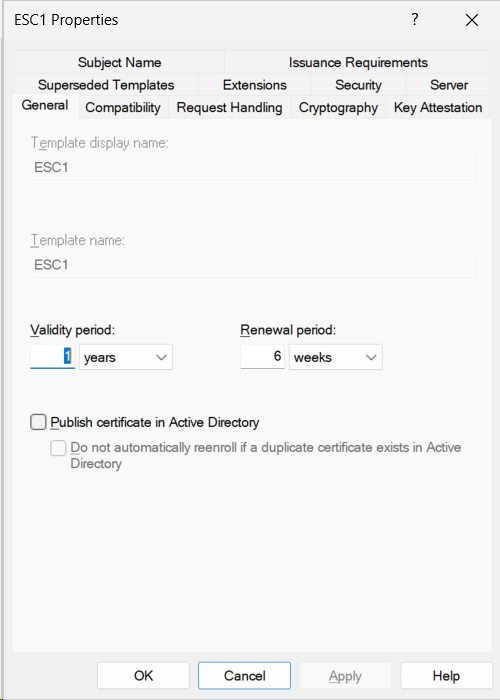
Throughout this article, we will reference a deliberately vulnerable template configured in the BrkrOps lab. The template is named ESC1 (the name itself, not anything subtle) and is configured to meet all four conditions of the attack path. The screenshots below show the General tab of the template — the baseline view before we examine each dangerous setting in turn.
The four conditions are:
Condition 1 — The template issues certificates usable for client authentication.
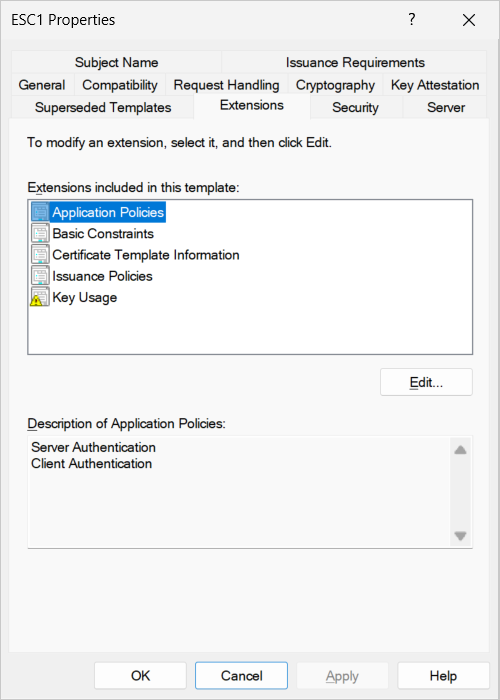
The certificate template's Extended Key Usage (EKU) list includes Client Authentication (1.3.6.1.5.5.7.3.2), or one of its functional equivalents: Smart Card Logon (1.3.6.1.4.1.311.20.2.2), PKINIT Client Authentication (1.3.6.1.5.2.3.4), or Any Purpose (2.5.29.37.0). A certificate without any of these EKUs cannot be used to authenticate to Active Directory and is therefore not exploitable for this attack. A certificate with one of them can be presented to a domain controller, and the KDC will treat it as a valid login credential.
In our lab template, the Extensions tab shows Application Policies containing Client Authentication and Server Authentication. The first one — Client Authentication — is what makes this template usable as a login credential. Server Authentication is irrelevant to ESC1; it is what the template was probably created for in the first place (a web server certificate), and it explains why an administrator at some point in the past thought this was a normal, benign template.
Condition 2 — The enrollee can supply the Subject Alternative Name.
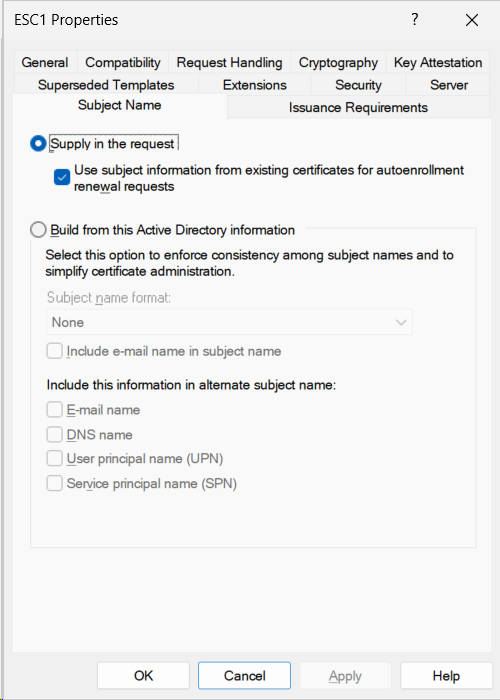
The template is configured with "Supply in the request" selected on the Subject Name tab, rather than "Build from this Active Directory information." When this flag is set, the certificate requester gets to specify the Subject and Subject Alternative Name fields directly in the request, rather than the CA constructing them from the requester's AD account.
This is the dangerous flag, and at the protocol level it is represented as CT_FLAG_ENROLLEE_SUPPLIES_SUBJECT (value 0x1) in the template's msPKI-Certificate-Name-Flag attribute. If you query the template with certutil -dstemplate <name>, this is the field to look for.
Why does this flag exist at all? Because there are legitimate use cases. A web server certificate is issued for a specific hostname that the requester needs to specify. A custom application may need certificates issued for identities that don't correspond directly to AD objects. Mobile device certificates issued via NDES need it because the device specifying its own identity is the whole point of the enrollment. The flag is not inherently bad — it is inherently dangerous when combined with the other three conditions.
Condition 3 — A low-privilege user has Enroll permission on the template.
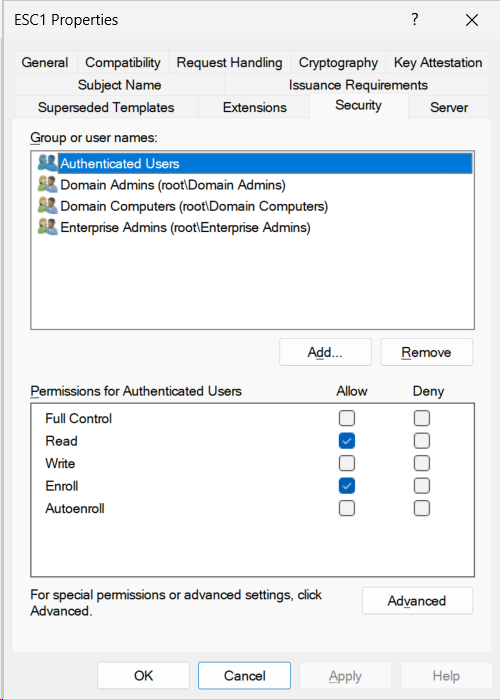
The template's discretionary access control list grants the Enroll right to a security principal that includes low-privilege users. In our lab template, the Security tab shows Authenticated Users with the Enroll permission allowed. Authenticated Users is the broadest possible grant — it includes every user account in the domain. Domain Users and Domain Computers are similarly broad.
This is where the attack surface explodes. If only Domain Admins could enroll in this template, ESC1 would be irrelevant — anyone who could exploit the misconfiguration is already domain admin. The vulnerability requires that someone without privileged access can reach the template.
Note: Enroll permissions can also be granted indirectly through nested group membership. A group called something innocuous like "PKI Operators" might have Enroll permission. If a low-privilege user is a member of a group that is a member of "PKI Operators," they still effectively have Enroll permission. Manual detection has to account for this; we will return to it in the detection section.
Condition 4 — Manager approval is not required.
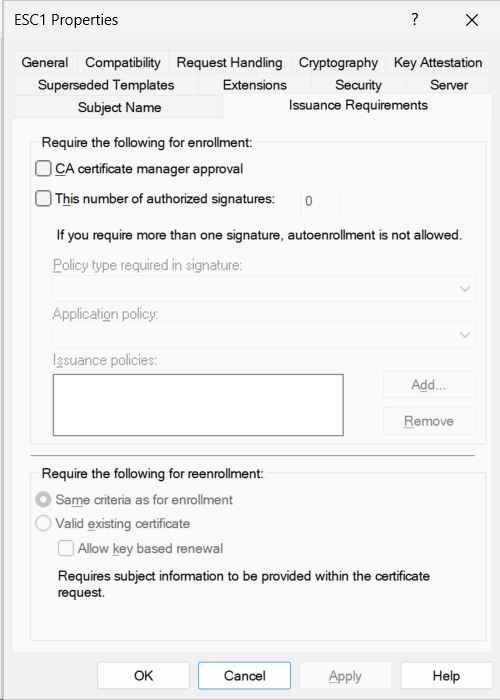
On the Issuance Requirements tab, "CA certificate manager approval" is unchecked. When this checkbox is unchecked, certificate requests against this template are issued automatically as long as the requester has Enroll permission. When it is checked, requests sit in a pending queue until a certificate manager reviews and approves them.
This is the final lever. If manager approval were required, an attacker requesting a certificate with Administrator@domain.local in the SAN would generate a pending request that a human would review and reject. Manager approval is not a strong control on its own — it depends on the certificate manager actually reading the SAN field of every request, which is operationally unsustainable in any environment with meaningful certificate volume — but its absence is a necessary condition for ESC1 to be exploitable without human intervention.
The combination is the vulnerability.
Each condition, on its own, has a legitimate reason to exist:
- Client Authentication EKU is needed for any template that issues login certificates (smart cards, VPN authentication, Wi-Fi, PKINIT).
- Enrollee-supplied subject is needed for web server templates and custom application certificates.
- Broad Enroll permissions are needed for self-service templates like user smart cards.
- No manager approval is needed for high-volume operational templates where human review isn't practical.
A template can have any one of these conditions without being vulnerable. A template can have any two of them with some risk but no clear attack path. A template can have any three with serious risk that depends on the missing fourth condition acting as a control. A template with all four is ESC1.
This is why ESC1 ends up in production environments without anyone noticing. The administrator who enabled "Supply in the request" was solving a legitimate problem for the web server team. The administrator who granted Domain Users the Enroll permission was making the template self-service. Neither change, in isolation, looked dangerous. The combination, which probably happened across multiple changes over multiple years by multiple administrators, is the vulnerability.
How the attack works
Understanding ESC1 in the abstract is one thing. Understanding what actually happens, step by step, when an attacker exploits it is another. This section walks through the attack mechanism — not to enable exploitation, but because defenders who don't understand the mechanism cannot effectively reason about detection or remediation.
Step 1: The attacker discovers the vulnerable template.
The attacker needs only authenticated access to the domain — a standard user account, no special privileges. From any domain-joined system, querying the Active Directory configuration partition reveals every published certificate template along with its full configuration: the EKU list, the name flags, the access control list, the issuance requirements. This information is, by design, readable by every authenticated user. Active Directory needs every user to be able to enumerate templates so that auto-enrollment can function.
The attacker does not need access to the certificate authority itself, only to the directory. They can do this enumeration from any workstation they have logged into, without triggering any access control or detection mechanism that wouldn't fire for normal directory queries.
Public tooling — most notably Certipy and Certify — automates this enumeration and flags templates matching the ESC1 pattern. We are not going to walk through the specific commands; the tooling is documented in its own repositories, and the relevant point for defenders is that this discovery step is fast, reliable, and indistinguishable from legitimate directory activity at the network level.
Step 2: The attacker requests a certificate.
Having identified the vulnerable template, the attacker submits a certificate enrollment request against it. The request specifies their target identity in the Subject Alternative Name field — typically a User Principal Name corresponding to a privileged account. The most common choice is the built-in Administrator account, but any account with elevated privileges works equally well: a Domain Admin, an Enterprise Admin, a tier-zero service account.
From the certificate authority's perspective, this looks like a normal enrollment request. The requester is authenticated. The requester has Enroll permission on the template. The template allows the requester to supply the subject. The template does not require manager approval. There is no condition the CA can check that would distinguish this request from a legitimate one — because, configured this way, there is no legitimate-versus-malicious distinction at the CA level. The configuration explicitly delegates the question of "is this subject correct?" to the requester.
The CA signs the certificate and returns it.
Step 3: The attacker authenticates as the target identity.
Now the attacker has a certificate. The certificate is mathematically valid: signed by a CA that domain controllers trust, with extensions indicating it is valid for client authentication. The subject alternative name field contains a UPN belonging to a privileged account.
When the attacker presents this certificate to a domain controller for authentication — via PKINIT for Kerberos, or via Schannel for legacy LDAP/HTTPS authentication — the domain controller validates the certificate's signature against the trusted CA chain. The validation succeeds because the certificate was, in fact, issued by a trusted CA.
The domain controller then maps the certificate to an Active Directory account. By default, this mapping is done using the UPN in the Subject Alternative Name. The domain controller looks up the account corresponding to that UPN — Administrator@domain.local — and issues a Kerberos Ticket Granting Ticket for that account.
The attacker is now authenticated as Administrator.
Step 4: Privilege use.
With a TGT for Administrator, the attacker can do everything Administrator can do. Request service tickets, access tier-zero systems, modify Active Directory, create new accounts, exfiltrate the Active Directory database, deploy persistence mechanisms. The PKI was the entry point, but once the Kerberos ticket exists, the rest of the attack is conventional Active Directory abuse — well-understood, well-documented, and not specific to PKI.
Why each step works.
The attack does not exploit a bug. There is no buffer overflow, no parser confusion, no cryptographic weakness. Every component is doing exactly what it was designed to do:
- The directory is doing what directories do: making configuration data available to authenticated principals.
- The certificate authority is doing what CAs do: issuing certificates to requesters with Enroll permission, according to the template configuration.
- The domain controller is doing what KDCs do: validating certificate-based authentication and mapping certificates to accounts based on the UPN in the SAN field.
The vulnerability is in the configuration of the template, not in the behavior of any system component. This is what makes ESC1 so common and so resistant to detection through traditional security tooling. Endpoint detection cannot flag it. Network monitoring cannot flag it. Audit log review will see only legitimate-looking certificate enrollments and Kerberos authentications. The only way to detect ESC1 is to inspect the template configurations directly.
Microsoft has, in more recent updates, introduced a mitigation: the szOID_NTDS_CA_SECURITY_EXT certificate extension (1.3.6.1.4.1.311.25.2), which embeds the requester's SID into the certificate, allowing the KDC to verify that the requester actually owns the identity claimed in the SAN. This mitigation, distributed in updates beginning with KB5014754, defaults to compatibility mode rather than enforcement mode in most environments. Enforcement requires explicit configuration. We will return to this in the remediation section, because it is the strongest single mitigation available but it has operational consequences worth understanding.
Why this is everywhere
ESC1 is one of the most frequently identified vulnerabilities in enterprise PKI assessments. This is not because the people running these environments are careless or unskilled. It is because the path that leads to an ESC1 misconfiguration is paved with reasonable individual decisions, made by competent administrators, under operational pressure, often years before anyone in the security community had a name for the resulting attack path.
This section is the honest accounting of how production environments end up here. If you are a defender reading this article and recognizing your own environment in what follows, you are in good company.
Default templates from older Server versions.
The certificate templates that ship with Active Directory Certificate Services have changed over the years. Older default templates — particularly those installed on Windows Server 2003 and 2008 era CAs — included configurations that today would be flagged as risky. A "Web Server" template installed in 2010 might have been configured with broad Enroll permissions because the CA was being used internally and the original administrator wanted self-service web certificates. That template, unchanged, may still be published on the same CA fifteen years later.
The templates themselves cannot easily be reconfigured to fix the issue — Microsoft's V1 templates do not allow modification of certain security-relevant settings. The fix is to duplicate the template as a V2 or V3 version and reconfigure the duplicate, then unpublish the original. This is a procedural change that requires understanding the template versioning model, the implications for existing certificates, and the coordination with anything currently enrolling against the original template. Many organizations have looked at this work and concluded that the existing template is "fine for now."
"Supply in the request" enabled for legitimate reasons.
The dangerous flag — CT_FLAG_ENROLLEE_SUPPLIES_SUBJECT — is set deliberately for templates that need it. Web server certificates need it because the subject is the application or site name rather than the hostname (pki.ranidae.net vs CA01.ranidae.net), which the CA cannot determine from the requester's AD account. Custom application certificates need it when the subject must match an external identity, a service principal, or a non-AD identifier. Mobile device certificates issued via NDES need it because the device specifying its own identity is the whole point of the enrollment.
An administrator setting up a template for web servers in 2018 enabled this flag because, without it, the template did not work for its intended purpose. They were not introducing a vulnerability. They were solving a problem. The template did its job, served the web team's needs for years, and was forgotten about.
The vulnerability arrived later, when somebody — possibly the same administrator, possibly a successor — needed to broaden the Enroll permissions on the template to support a new use case. Or when the Issuance Requirements were relaxed because the manager-approval workflow was creating a ticket backlog. Or when the template was duplicated for a different purpose and the new copy inherited the dangerous flag without anyone noticing.
No single change made the template vulnerable. The combination did.
Broad Enroll permissions as the path of least resistance.
In a multi-team enterprise, scoping certificate template Enroll permissions to specific groups is operationally expensive. It requires understanding which groups need which templates. It requires creating dedicated security groups for enrollment. It requires updating those groups as the organization changes. It requires documentation that survives administrator turnover.
The alternative — granting Domain Users or Authenticated Users the Enroll right — works immediately, requires no group management, and supports any future use case without further configuration. For a template that issues certificates for what looks like a low-risk purpose (web servers, code signing, internal applications), this often appears to be a fine trade-off.
The trade-off becomes a vulnerability when one of the other three conditions is also true. If the template happens to also issue certificates valid for client authentication, and happens to also allow enrollee-supplied subjects, and happens to also skip manager approval — the broad Enroll permission stops being convenience and starts being the attack surface.
Template sprawl and the forgotten template problem.
A mature Active Directory Certificate Services deployment accumulates templates over time. Each project that needs certificates publishes a template. Each application team that asks for "their own template" gets one. Templates are duplicated for variations — "WebServer-Internal," "WebServer-DMZ," "WebServer-Legacy-DoNotUse" — and the duplicates outlive the people who created them.
A typical enterprise ADCS deployment publishes between thirty and a hundred templates. A meaningful percentage of those templates are no longer in active use. Some were created for projects that were cancelled. Some were duplicated for testing and never cleaned up. Some were created by administrators who have long since left the company. The documentation, where it exists at all, has often not been updated since the original deployment.
ESC1 frequently hides in these forgotten templates. The vulnerable configuration is on a template nobody is actively using or actively reviewing. It is published, enrollable by Authenticated Users, and silently waiting. The administrator running an audit sees forty templates and reviews the five they recognize; the other thirty-five are inventory questions for another day. The attacker enumerating templates does not care which ones are "actively used." They care which ones are vulnerable.
The "set up once and forget" deployment model.
Active Directory Certificate Services is unusual among enterprise infrastructure in how rarely it is touched after initial deployment. A typical AD CS deployment is configured during a project, validated, handed off to operations, and then ignored for years. The operations team that owns it day-to-day is not usually a PKI team — it is the Active Directory team, the Windows infrastructure team, or the security team's "we own this because nobody else does" portfolio.
PKI is correctly perceived as a domain that requires specialist knowledge to modify safely. The result is that nobody modifies it. Changes that probably should happen — reviewing templates, tightening permissions, removing unused templates, applying new mitigations from Microsoft — do not happen, because the people who own the system day-to-day are reasonably reluctant to change something they don't fully understand. The system that was secure-enough in 2017 is still configured exactly as it was in 2017, while the threat landscape and Microsoft's recommended baseline have both moved on.
This is the structural reason ESC1 is so prevalent. It is not a failure of vigilance. It is a consequence of how PKI is treated as a category in enterprise IT — as critical infrastructure that nobody wants to touch.
The point of this section is not to absolve anyone. ESC1 is a real vulnerability with real consequences, and the templates have to be fixed. But understanding how production environments end up with ESC1 changes how the conversation goes when you find it.
The administrator who set up the template in 2018 was not negligent. The team that has been running it since is not incompetent. They were doing their jobs, and the slow accumulation of reasonable individual decisions produced an outcome that nobody at any point intended.
The next sections of this article walk through detection and remediation. The framing is important: this is work to be done, not blame to be assigned. The templates have to be reviewed and fixed. The teams responsible for the PKI need the tooling and the time to do that work. The conversation about how to find the vulnerable templates in your environment is the same conversation regardless of who configured them, when, or why.
Detecting ESC1 in your environment
The previous sections explained what ESC1 is and why it ends up in production. This section is the practical work: how to find it in your own environment using built-in Windows tooling, with no third-party software required.
We will work through three approaches, in order of increasing rigor. The first approach uses certutil and gives a fast, readable summary of a single template's configuration. The second uses PowerShell against the Active Directory configuration partition and lets you enumerate every published template at once. The third addresses the part that breaks the first two: properly expanding nested group memberships to understand who can actually enroll.
All commands in this section are read-only. None of them modify the directory, the CA, or any template. They can be run safely against a production environment by anyone with standard domain user access — the same access an attacker enumerating ESC1 would have.
Approach 1: certutil for spot-checking a known template.
certutil is the built-in Windows command-line utility for certificate services management. It has dozens of subcommands and is, by reputation, one of the most cryptic utilities Microsoft ships. For our purposes, one subcommand matters: -dstemplate, which dumps the configuration of one or all certificate templates as they exist in Active Directory.
To inspect a single template by name:
certutil -dstemplate WebServer-CustomTo list every template along with its configuration:
certutil -dstemplateThe output is verbose. The fields that matter for ESC1 are:
msPKI-Certificate-Name-Flag: look for CT_FLAG_ENROLLEE_SUPPLIES_SUBJECT (0x1) in the bitmask. If present, condition 2 is met.
pKIExtendedKeyUsage: look for 1.3.6.1.5.5.7.3.2 (Client Authentication), 1.3.6.1.4.1.311.20.2.2 (Smart Card Logon), 1.3.6.1.5.2.3.4 (PKINIT Client Authentication), or 2.5.29.37.0 (Any Purpose). Any of these means condition 1 is met.
msPKI-Enrollment-Flag: look for the absence of CT_FLAG_PEND_ALL_REQUESTS (0x2). If absent, manager approval is not required and condition 4 is met.
nTSecurityDescriptor: the access control list. Look for Enroll permission granted to broadly-scoped principals. Condition 3 requires interpretation; the next two approaches handle this more rigorously.
A template with all four conditions visible in certutil -dstemplate output is ESC1. A template missing any one of them is not ESC1, though it may be adjacent — a template with three of the four conditions is one configuration change away from being vulnerable.
certutil is fine for spot-checking a template you already suspect. It is unsuitable for environment-wide enumeration. Reading the output of certutil -dstemplate against an environment with forty templates is tractable but tedious; against an environment with a hundred and twenty templates across multiple forests, it becomes a project.
Approach 2: PowerShell enumeration against the AD configuration partition.
Certificate templates are stored as Active Directory objects under CN=Certificate Templates,CN=Public Key Services,CN=Services,CN=Configuration,<forest root>. They are readable by any authenticated user. PowerShell can enumerate them, filter on the relevant attributes, and produce a list of templates that meet the ESC1 conditions in a few seconds.
The following script enumerates all published templates in the current forest and identifies those matching the first three machine-readable conditions: dangerous EKU, enrollee-supplied subject, and no manager approval requirement. (The fourth condition — broad Enroll permission — requires ACL interpretation, which we address in Approach 3.)
# Find candidate ESC1 templates in the current forest.
# Server 2022 native. Read-only.
# Requires: ActiveDirectory module (RSAT).

Set-StrictMode -Version Latest
$ErrorActionPreference = 'Stop'
Import-Module ActiveDirectory

$configNC      = (Get-ADRootDSE).configurationNamingContext
$templatesPath = "CN=Certificate Templates,CN=Public Key Services,CN=Services,$configNC"

$dangerousEKUs = @(
    '1.3.6.1.5.5.7.3.2',          # Client Authentication
    '1.3.6.1.4.1.311.20.2.2',     # Smart Card Logon
    '1.3.6.1.5.2.3.4',            # PKINIT Client Authentication
    '2.5.29.37.0'                 # Any Purpose
)

$templates = Get-ADObject -SearchBase $templatesPath `
    -LDAPFilter '(objectClass=pKICertificateTemplate)' `
    -Properties name, displayName, 'msPKI-Certificate-Name-Flag',
                'msPKI-Enrollment-Flag', pKIExtendedKeyUsage

$candidates = foreach ($t in $templates) {
    # Attributes may be null on templates where the flag is unset.
    # A null bitmask interpreted as integer is 0, which is the safe default.
    $nameFlag   = if ($t.'msPKI-Certificate-Name-Flag') { [int]$t.'msPKI-Certificate-Name-Flag' } else { 0 }
    $enrollFlag = if ($t.'msPKI-Enrollment-Flag')        { [int]$t.'msPKI-Enrollment-Flag' }        else { 0 }
    $ekus       = @($t.pKIExtendedKeyUsage)  # Multi-valued; @() handles null

    $suppliesSubject  = ($nameFlag   -band 0x1) -ne 0  # CT_FLAG_ENROLLEE_SUPPLIES_SUBJECT
    $requiresApproval = ($enrollFlag -band 0x2) -ne 0  # CT_FLAG_PEND_ALL_REQUESTS
    $matchingEKUs     = @($ekus | Where-Object { $dangerousEKUs -contains $_ })

    if ($suppliesSubject -and -not $requiresApproval -and $matchingEKUs.Count -gt 0) {
        [PSCustomObject]@{
            Name            = $t.name
            DisplayName     = $t.displayName
            SuppliesSubject = $suppliesSubject
            ManagerApproval = $requiresApproval
            DangerousEKUs   = $matchingEKUs -join ', '
        }
    }
}

if ($candidates) {
    Write-Host "Templates meeting 3 of 4 ESC1 conditions:" -ForegroundColor Yellow
    $candidates | Format-Table -AutoSize
    Write-Host ""
    Write-Host "For each template above, run Expand-EnrollPrincipals to evaluate condition 4."
} else {
    Write-Host "No templates in this forest meet the first three ESC1 conditions." -ForegroundColor Green
}
The output is a list of templates that meet three of the four ESC1 conditions. Every template on the list needs the fourth condition checked: does a low-privilege principal have Enroll permission? That is where Approach 3 comes in.
A note on the flag values: msPKI-Certificate-Name-Flag and msPKI-Enrollment-Flag are bitmasks. The PowerShell -band operator performs the bitwise AND that isolates the specific flag we care about. CT_FLAG_ENROLLEE_SUPPLIES_SUBJECT is bit 0x1 of the name flag; CT_FLAG_PEND_ALL_REQUESTS is bit 0x2 of the enrollment flag. The full bitmask documentation is in Microsoft's [MS-CRTD] specification, which is the authoritative reference for these attributes.
Approach 3: Enroll permission analysis with nested group expansion.
This is the part of detection that becomes hard at scale, and the part that determines whether a candidate template is actually ESC1 or just looks like it.
The template's nTSecurityDescriptor attribute contains the access control list. Each access control entry grants a specific right to a specific principal. The right that matters for ESC1 is "Enroll" — represented in the schema as an extended right with the GUID 0e10c968-78fb-11d2-90d4-00c04f79dc55.
For a template to be ESC1, an ACE granting Enroll must be in effect for a low-privilege principal. The complication is that ACEs grant rights to security principals, and security principals can be groups, and groups can contain other groups. An ACE granting Enroll to a group called "PKI Operators" is not, in itself, alarming — it sounds like a privileged group. But if "PKI Operators" contains "Server Admins," which contains "Domain Users," then in practice every authenticated user has Enroll permission on the template.
This is the failure mode of casual ACL review. A reviewer looks at the Security tab in certtmpl.msc, sees that Enroll is granted to a group with a reasonable-sounding name, and concludes the template is not broadly enrollable. They are correct about what the ACL says and wrong about what the ACL means.
Proper detection requires recursive group expansion. The following script takes a template name and resolves every Enroll-granted principal — including well-known broad SIDs like Authenticated Users — to its complete transitive member set:
# Expand Enroll permission for a single template, with recursive group resolution.
# Server 2022 native. Run as a standard domain user (no elevation required).
# Read-only.
#
# Requires: ActiveDirectory module (RSAT-AD-PowerShell on Server,
#           RSAT: Active Directory DS-LDS Tools on Windows 11).

Set-StrictMode -Version Latest
$ErrorActionPreference = 'Stop'

if (-not (Get-Module -ListAvailable -Name ActiveDirectory)) {
    Write-Error 'ActiveDirectory module not available. Install RSAT-AD-PowerShell.'
    return
}
Import-Module ActiveDirectory

function Expand-EnrollPrincipals {
    [CmdletBinding()]
    param(
        [Parameter(Mandatory)]
        [string]$TemplateName
    )

    $configNC      = (Get-ADRootDSE).configurationNamingContext
    $templatesPath = "CN=Certificate Templates,CN=Public Key Services,CN=Services,$configNC"
    $enrollRight   = [Guid]'0e10c968-78fb-11d2-90d4-00c04f79dc55'

    # Well-known SIDs that broadly include low-privilege users.
    # These cannot be resolved with NTAccount.Translate() in all contexts,
    # so we match them directly by SID string.
    $broadSids = @{
        'S-1-1-0'      = 'Everyone'
        'S-1-5-11'     = 'Authenticated Users'
        'S-1-5-7'      = 'Anonymous Logon'
        'S-1-5-32-545' = 'BUILTIN\Users'
    }

    $template = Get-ADObject -SearchBase $templatesPath `
        -LDAPFilter "(&(objectClass=pKICertificateTemplate)(name=$TemplateName))" `
        -Properties nTSecurityDescriptor

    if (-not $template) {
        Write-Warning "Template '$TemplateName' not found."
        return
    }

    $enrollAces = $template.nTSecurityDescriptor.Access | Where-Object {
        $_.AccessControlType -eq 'Allow' -and $_.ObjectType -eq $enrollRight
    }

    if (-not $enrollAces) {
        Write-Host "No explicit Enroll ACEs found on '$TemplateName'."
        return
    }

    foreach ($ace in $enrollAces) {
        $principal = $ace.IdentityReference.Value
        Write-Host ""
        Write-Host "ACE grants Enroll to: $principal" -ForegroundColor Cyan

        # Resolve to a SID first; this works for well-known principals too.
        try {
            $sid = ([System.Security.Principal.NTAccount]$principal).Translate(
                [System.Security.Principal.SecurityIdentifier]).Value
        } catch {
            Write-Host "  WARNING: cannot resolve principal to SID. Possible " `
                       "foreign security principal or deleted account." -ForegroundColor Yellow
            continue
        }

        # Well-known broad SID: condition 3 is met without further expansion.
        if ($broadSids.ContainsKey($sid)) {
            Write-Host "  *** BROAD SID DETECTED: $($broadSids[$sid]) (SID $sid) ***" `
                -ForegroundColor Red
            Write-Host "  This template grants Enroll to a well-known broad principal." `
                -ForegroundColor Red
            Write-Host "  Condition 3 of ESC1 is satisfied."
            continue
        }

        # Otherwise, look up the AD object by SID.
        try {
            $obj = Get-ADObject -LDAPFilter "(objectSid=$sid)" `
                -Properties objectClass, distinguishedName, sAMAccountName
        } catch {
            Write-Host "  WARNING: directory lookup failed for SID $sid." -ForegroundColor Yellow
            continue
        }

        if (-not $obj) {
            Write-Host "  WARNING: SID $sid does not resolve to a directory object " `
                       "in this forest (possible cross-forest principal)." -ForegroundColor Yellow
            continue
        }

        if ($obj.objectClass -eq 'group') {
            try {
                $members = Get-ADGroupMember -Identity $obj.distinguishedName -Recursive |
                    Select-Object -ExpandProperty sAMAccountName -ErrorAction SilentlyContinue
                Write-Host "  Group with $($members.Count) transitive member(s):"
                $members | ForEach-Object { Write-Host "    $_" }
                if ($members.Count -gt 100) {
                    Write-Host "  *** Large member count suggests broad enrollment access. ***" `
                        -ForegroundColor Red
                }
            } catch {
                Write-Host "  WARNING: Get-ADGroupMember failed. Group may contain " `
                           "foreign security principals not resolvable from this forest." `
                           -ForegroundColor Yellow
            }
        } else {
            Write-Host "  (Direct principal: $($obj.sAMAccountName), not a group)"
        }
    }
}

# Example usage:
Expand-EnrollPrincipals -TemplateName 'WebServer-Custom'
The output lists every principal that effectively has Enroll permission on the template. The script handles three distinct cases:
- Well-known broad SIDs (Authenticated Users, Everyone, BUILTIN\\Users, Anonymous Logon) are flagged immediately as condition-3 matches without further expansion. These principals cannot always be resolved as accounts, but their meaning is unambiguous.
- Resolvable group principals are expanded recursively, with their transitive members listed.
- Unresolvable principals (foreign security principals from trusted forests, deleted accounts, cross-forest SIDs) are warned about explicitly rather than silently ignored. These are exactly the cases where manual detection produces wrong answers.
Where manual detection breaks down.
The three approaches above are sufficient to detect ESC1 in a single-forest environment with a tractable number of templates and groups. They scale poorly past that point.
Consider a real multi-forest enterprise: six forests, each with its own AD CS deployment, each publishing between twenty and sixty templates. Total: roughly two hundred and forty templates to enumerate. Each template's nTSecurityDescriptor references principals from its own forest. Some templates also reference principals from trusted forests, via foreign security principal objects, which need to be resolved across the trust. Some groups are universal groups whose membership is replicated to the global catalog; some are domain local groups whose membership lives only in the originating domain. Some groups have stale memberships — accounts that no longer exist but whose SIDs are still listed.
Doing the recursive group expansion correctly across all of this means understanding the AD trust topology, having sufficient permission in each forest to query group memberships, handling cross-forest SID translation, and accounting for tombstoned objects. The PowerShell above works in a single forest. Extending it across a multi-forest trust topology is a multi-week engineering project.
This is the structural reason manual detection of ESC1 is brittle at scale. The technique is straightforward. The execution against a real enterprise topology is not.
A note on what the manual approach doesn't catch.
Even a flawless implementation of the three approaches above catches only the ESC1 condition we have described. It does not catch templates that are one configuration change away from ESC1 — templates with three of the four conditions, where a future change might introduce the fourth. It does not catch ESC2 through ESC16, each of which has its own configuration signature. It does not catch the related issues of certificate authority misconfiguration (ESC6, ESC11) or PKI object ACL misconfiguration (ESC5, ESC7), which require checking different objects entirely.
Detecting ESC1 manually is the first step. Detecting the broader class of ADCS misconfiguration vulnerabilities — and doing it on a continuous basis, so that changes are caught before they become exposures — is what eventually drives organizations toward automated assessment.
Remediating ESC1
ESC1 is remediated by breaking at least one of the four conditions. Because each of the four conditions has legitimate use cases, the right choice depends on what the template was originally meant to do. This section walks through the four levers, the trade-offs of each, and how to combine them into a remediation strategy that closes the vulnerability without breaking the template's purpose.
Lever 1: Restrict Enroll permissions to a scoped group.
The most operationally clean fix is to remove the broad Enroll permission and grant it instead to a dedicated security group whose membership is explicit and audited. If only a known set of accounts can request a certificate from the template, the attack surface is reduced to those accounts.
In our lab, this is exactly the remediation we applied. The Authenticated Users principal had its Enroll permission removed. A new security group, CRT-T1-Enroll-WebServer, was created with explicit membership of the servers and service accounts that legitimately need to enroll. The template's Security tab now grants Read to Authenticated Users (so the template remains discoverable for normal directory operations) but grants Enroll only to the dedicated group.
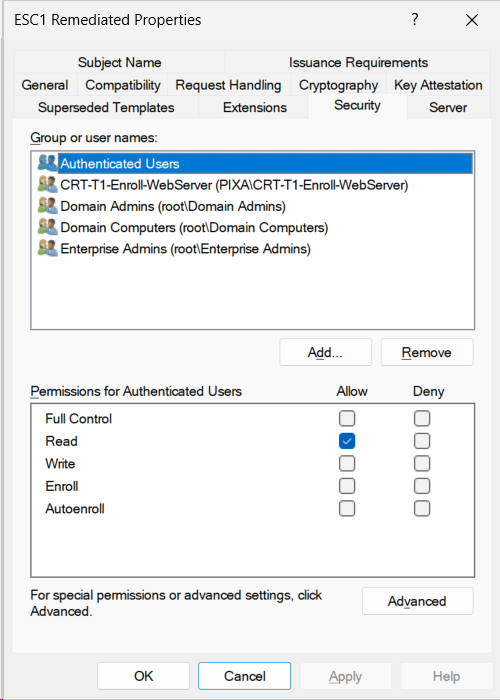
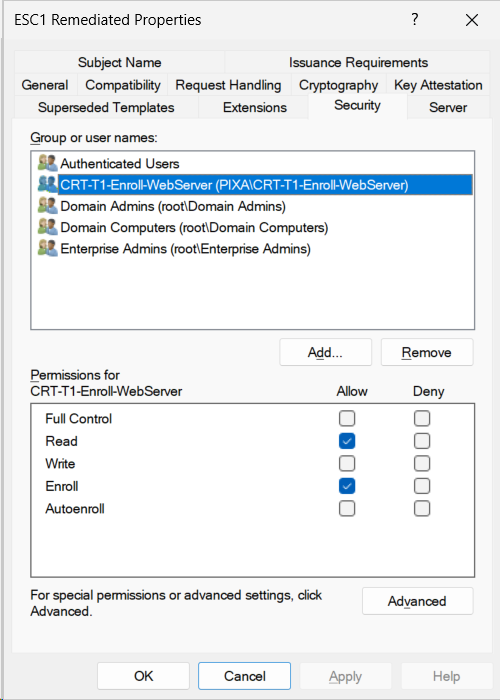
This is the cleanest fix because it preserves the operational behavior of the template (it still works for its intended users) while eliminating the broad attack surface. The trade-off is the work of identifying who legitimately needs to enroll, creating and populating the security group, and maintaining its membership over time.
For templates that are genuinely self-service for all users — for example, a smart card template that every employee enrolls in — restricting Enroll permission is not viable. Those templates need one of the other remediations.
Lever 2: Require manager approval.
Setting "CA certificate manager approval" on the Issuance Requirements tab causes every request against the template to enter a pending state until a certificate manager reviews and approves it. An attacker requesting a certificate with Administrator@domain.local in the SAN field generates a pending request that a human can recognize and reject.
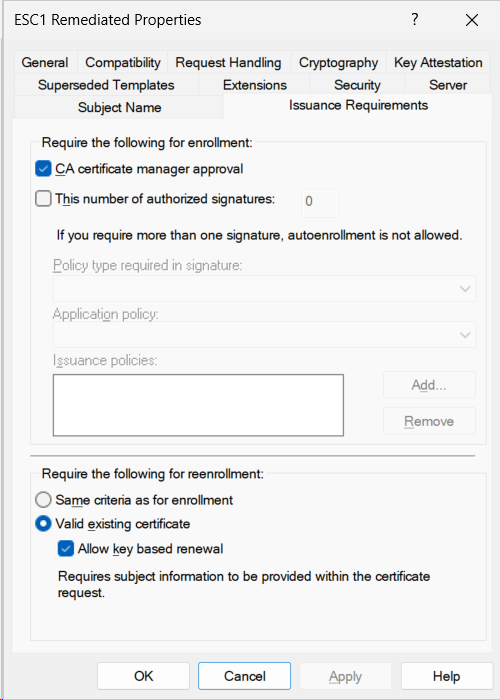
This is a strong technical control with a significant operational cost. Every certificate request requires human intervention. For a template that issues thousands of certificates per month, this is unsustainable. For a template that issues tens of certificates per month, it may be appropriate. For a template that should rarely issue certificates at all — a template used by a small number of administrators for an unusual purpose — it is ideal.
The reenrollment configuration matters. If "Same criteria as for enrollment" is selected, every certificate renewal also triggers manager approval, which causes operational pain for legitimate users whose certificates are nearing expiry. The remediation in our lab uses "Valid existing certificate" with "Allow key based renewal" enabled, which permits automatic renewal of already-issued certificates without re-triggering the approval workflow. This is the operationally correct setting for most use cases.
Manager approval is not a strong control on its own. It depends entirely on whoever approves requests actually examining the SAN field of each request. If approvers click through requests without inspecting them — which happens, predictably, in any environment where approval volume exceeds approver attention — manager approval provides no real protection. It is a useful layer when combined with other controls; it is a fragile control on its own.
Lever 3: Disable enrollee-supplied subject.
Removing the CT_FLAG_ENROLLEE_SUPPLIES_SUBJECT flag — switching the Subject Name tab from "Supply in the request" to "Build from this Active Directory information" — eliminates condition 2 of ESC1. The CA will construct the certificate subject and SAN from the requester's AD account rather than from values supplied by the requester. An attacker can no longer specify Administrator in the SAN because the SAN is determined by their own account, not their input.
This is the most direct fix for ESC1 — it removes the root capability that makes the attack possible. The trade-off is operational: any legitimate use case that required the flag in the first place is now broken. Web server templates, NDES templates, custom application templates that need to specify their own subjects will no longer function.
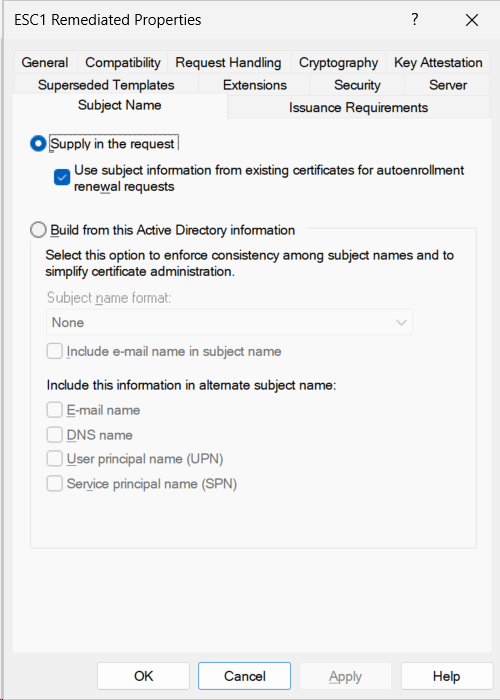
For templates where enrollee-supplied subject is genuinely needed, disabling the flag is not viable. Compensating controls — scoped enrollment, manager approval, or the SID extension mitigation discussed below — must close the path instead.
Lever 4: Enforce the SID certificate extension (KB5014754).
Microsoft's strongest mitigation is the szOID_NTDS_CA_SECURITY_EXT certificate extension, introduced in updates beginning with KB5014754 in May 2022. The extension embeds the requester's SID into the certificate at issuance time. When the certificate is later used for authentication, the KDC compares the SID in the extension to the SID of the account the certificate is mapping to. If they do not match — for example, if a low-privilege user's certificate claims a SAN belonging to Administrator — the authentication is rejected.
This is the strongest single mitigation against ESC1 and related attack paths. It does not require modifying any template. It does not change the operational behavior of legitimate enrollments. It defends against the entire class of "enrollee specifies a privileged identity" attacks at the protocol level rather than the configuration level.
The complication is the rollout. Microsoft introduced the extension in compatibility mode rather than enforcement mode, to avoid breaking environments with legacy certificates that predate the extension. In compatibility mode, the KDC validates the extension when it is present but does not require it. In enforcement mode (StrongCertificateBindingEnforcement registry value set to 2), the KDC rejects certificates that do not contain the extension.
Compatibility mode protects against new ESC1 attacks because newly issued certificates from patched CAs contain the extension. Enforcement mode is the desired end state, but most environments cannot move to it until every legacy certificate that lacks the extension has expired or been reissued. Microsoft originally targeted full enforcement for early 2023; the deadline has been extended multiple times as the operational complexity of the migration became apparent across the deployed base.
Practical guidance: ensure all CAs in your environment have KB5014754 or later installed. Audit your environment for certificates lacking the SID extension and plan their reissuance. Move to enforcement mode as soon as your environment is ready. The Microsoft guidance article for KB5014754 is the authoritative reference for the rollout plan, including registry values, audit log entries to monitor, and the timeline.
Putting the levers together.
A robust remediation strategy uses multiple levers in combination. The lab template in this article uses three:
- Lever 1: Enroll permission was removed from Authenticated Users and granted only to a dedicated security group with explicit membership.
- Lever 2: CA certificate manager approval was enabled, with renewal configured to use the existing certificate to avoid breaking auto-renewal.
- Lever 4: The CA is patched with KB5014754, so newly issued certificates carry the SID extension and the KDC validates it in compatibility mode.
We deliberately did not use Lever 3 (disabling enrollee-supplied subject) because the template's intended purpose — issuing web server certificates with custom SANs — requires that flag. The combination of restricted enrollment, manager approval, and SID extension validation closes the ESC1 attack path while preserving the legitimate operational behavior of the template.
This is the framing the BrkrOps assessment methodology applies to ESC1 findings: identify the legitimate use case, choose the levers that close the attack path without breaking the use case, document the remaining residual risk, and validate the remediation against the same detection that found the original vulnerability.
The reality at scale
Everything in this article so far — the detection, the remediation, the lever choices — is tractable for a single template in a single forest. The operational reality of enterprise PKI is rarely that simple.
Consider what the work looks like in a mid-to-large enterprise:
- The organization has between three and fifteen Active Directory forests, depending on history and acquisition activity.
- Each forest has at least one operational CA, often two or three for redundancy or to separate issuing roles.
- Each CA publishes between twenty and sixty templates.
- Total: somewhere between two hundred and a thousand templates that need to be enumerated, evaluated against the four ESC1 conditions, and individually remediated where necessary.
Doing this work manually means running the detection scripts in every forest with appropriate credentials, correlating the results across forests, identifying templates that exist in multiple forests with the same configuration, and producing a list of templates that need remediation. Then, for each template, identifying the legitimate use case, choosing the appropriate levers, coordinating with the application teams that depend on the template, scheduling the change, executing it, and validating that the attack path is closed.
This is not a one-time project. PKI changes. New templates get published. Existing templates get modified. Permissions get granted to support new use cases and forgotten about. An environment that is clean of ESC1 today can have ESC1 again in six months, introduced by a template change made by someone who didn't realize the implications.
The work, done thoroughly, is a continuous program rather than a project: regular scheduled assessment, comparison against the last baseline, identification of new findings, scheduled remediation, validation. Most organizations do not have the headcount or the specialist PKI expertise to run such a program manually.
This is the gap that automated assessment tools fill. They are not a replacement for understanding the underlying mechanics, which is why this article spent so much time on conditions, attack mechanism, and remediation levers. The defender who understands ESC1 can reason about findings, evaluate severity, choose remediation strategies, and validate that the attack path is closed. The defender who does not understand ESC1 is just reading a report. Tooling is an amplifier of expertise, not a substitute for it.
How Truvald handles this
Truvald is a PKI security assessment tool built by BrkrOps for the exact scope of work this article describes.
Truvald enumerates every certificate template across every CA in every forest it has access to. For each template, it evaluates the four ESC1 conditions, expands Enroll permissions through nested group membership including across forest trusts, and produces a list of templates that satisfy all four conditions of ESC1. The same engine evaluates ESC2 through ESC16, plus the broader set of certificate authority configuration, PKI object ACL, and GPO settings that affect the security posture of the PKI as a whole — eighty-plus controls in total.
The output is a written assessment report (Word format) covering every finding by severity, with the specific template, the specific misconfiguration, the recommended remediation, and the residual risk if the remediation is partial. The report is suitable for technical teams and for executive review.
Truvald runs entirely inside the customer's network. There is no cloud component. No telemetry. No data is sent to BrkrOps. The architecture is deliberate: the data being assessed — certificate templates, CA configurations, AD structure — is among the most sensitive in an enterprise environment, and Truvald is designed so that BrkrOps never has access to it.
A free 30-day evaluation is available at truvald.ca. For organizations that want the assessment delivered as an engagement — BrkrOps running Truvald in your environment, producing the report, and walking your team through the remediation roadmap — the Truvald + Assessment package combines the license with three days of BrkrOps consulting.
References and further reading
The authoritative sources for the material in this article:
- Will Schroeder and Lee Christensen. Certified Pre-Owned: Abusing Active Directory Certificate Services. SpecterOps, June 2021. The original research that named and catalogued the ESC attack paths.
- SpecterOps blog series on AD CS attack paths. Posts covering ESC1 through ESC16 with technical depth on each.
- Microsoft [MS-CRTD]: Certificate Templates Structure. The authoritative reference for the certificate template attributes, flags, and bitmasks used in detection.
- Microsoft KB5014754: Certificate-based authentication changes on Windows domain controllers. The official guidance on the SID extension mitigation, the compatibility-vs-enforcement mode transition, and the registry settings that control behavior.
- MITRE ATT&CK T1649: Steal or Forge Authentication Certificates. The ATT&CK technique that covers ESC1 and related attack paths.
Next in this series: ESC2 — When a template trusts everything. We will walk through Any Purpose EKUs, unrestricted certificate usage, and the detection pattern that catches templates one configuration flag away from ESC1.